

More articles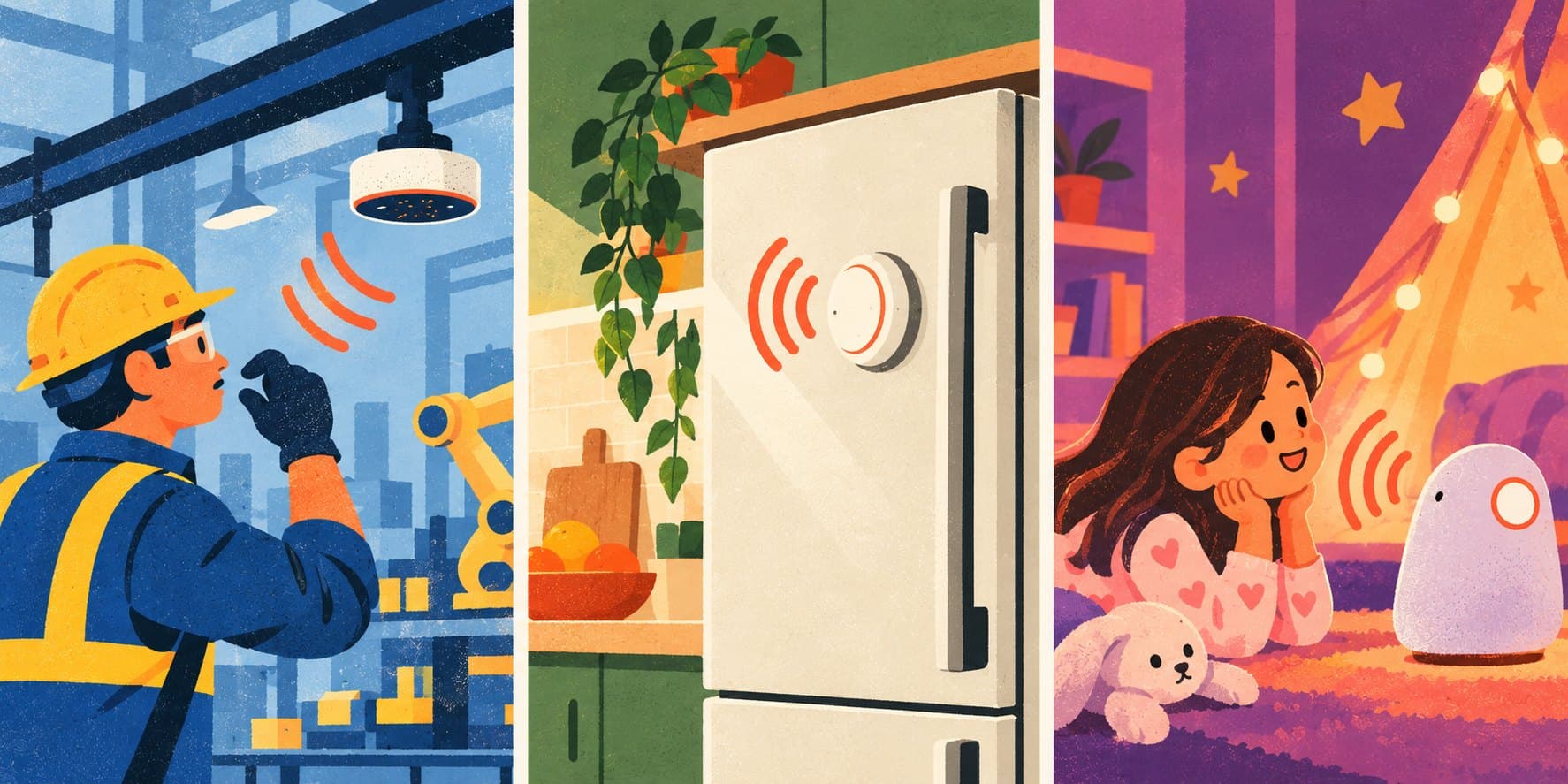
Build a $10 Conversational Device with Higgs Realtime and ESP32
Developers can now build low-cost conversational devices powered by Higgs Realtime using Elato’s open-source stack. With an approximately $10 ESP32-S3 board, a microphone and a speaker, the reference implementation brings live, interruptible speech-to-speech interaction to low-power hardware without requiring external PSRAM.
A kitchen assistant can guide someone through a recipe and adapt when they ask a question. An equipment interface can provide hands-free instructions while the operator is working. An educational toy can become a character that listens, responds and changes the story in real time. Higgs Realtime provides the conversational intelligence, while the ESP32 captures and streams audio and plays each response as it is generated.
Why Higgs Realtime
Most connected voice devices still behave like walkie-talkies: listen, stop, process and then play a completed answer. Higgs Realtime is designed for continuous interaction. It streams responses as they are generated, detects when the user speaks again, recovers cleanly from interruption and can call tools to take action in the surrounding application. This allows even a low-cost device to support a conversation that feels responsive, adaptive and connected to real workflows.
The model runs in the cloud. On the device, the work is limited to audio capture, networking, decoding and playback. This keeps the processing and memory requirements small enough for an ESP32-S3 and lets developers configure the voice and instructions on the server.
The hardware
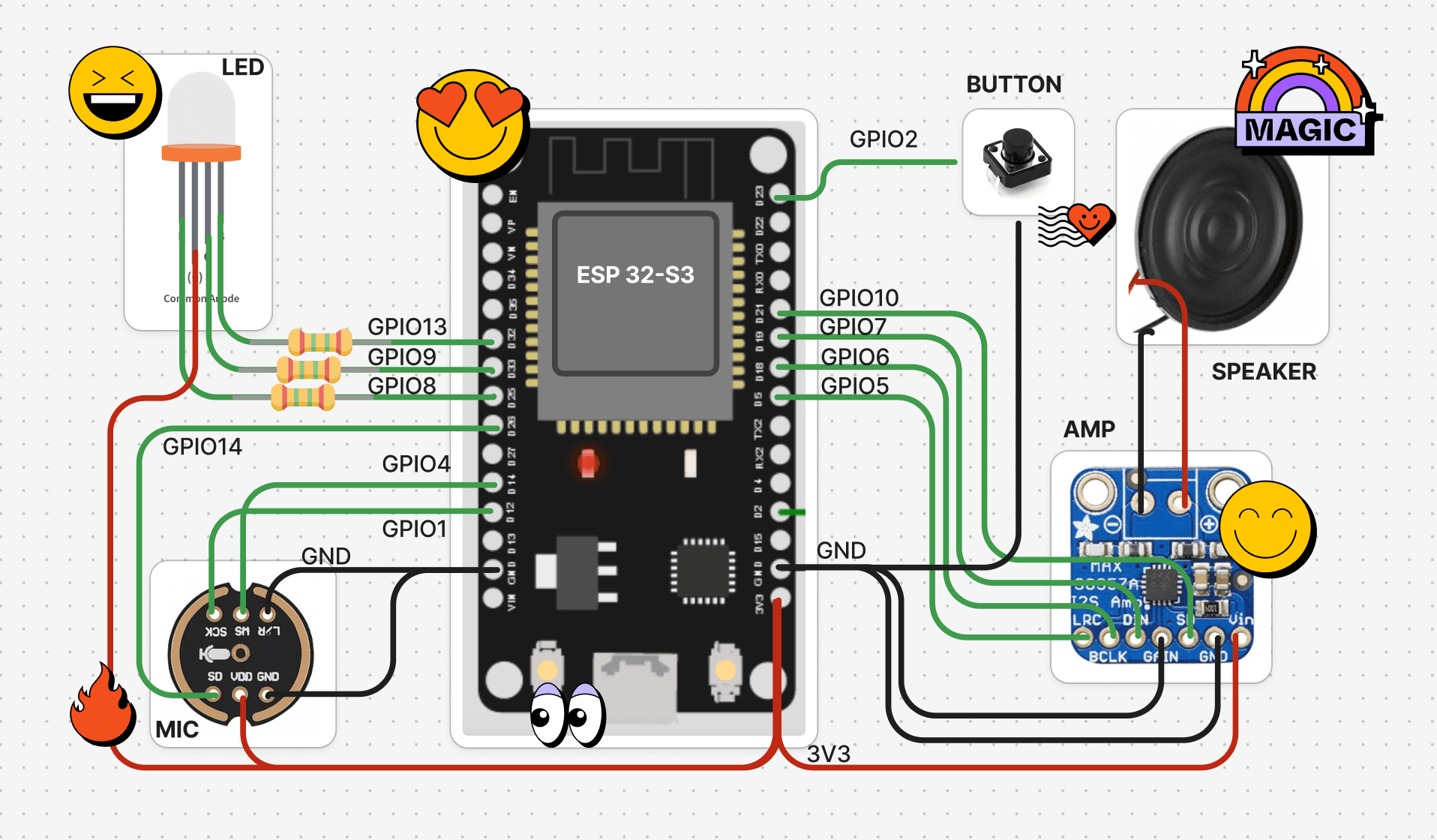
The reference build uses:
- An ESP32-S3 development board with Wi-Fi
- An INMP441 I2S microphone
- A MAX98357A I2S amplifier and a small speaker
- A button or touch pad to control the conversation
- An RGB LED for status feedback
The microphone and amplifier connect to separate I2S ports for audio input and output. Pin assignments live in the firmware’s
Config.cpp, so builders can adapt the wiring to their board layout. The firmware uses the Arduino framework and can be built and flashed with PlatformIO.// firmware-arduino/src/Config.cppconst uint32_t MIC_SAMPLE_RATE = 16000;// INMP441 microphone on I2S_NUM_1const int I2S_SCK = 1;const int I2S_WS = 4;const int I2S_SD = 14;// MAX98357A amplifier on I2S_NUM_0const int I2S_BCK_OUT = 6;const int I2S_WS_OUT = 5;const int I2S_DATA_OUT = 7;const int I2S_SD_OUT = 10;// Button or touch pad; also wakes the device from deep sleepconst gpio_num_t BUTTON_PIN = GPIO_NUM_2;const int RED_LED_PIN = 9, GREEN_LED_PIN = 8, BLUE_LED_PIN = 13;
Deep sleep reduces idle power use between sessions. Battery requirements depend on the application: Wi-Fi, audio processing, speaker volume and time spent in conversation all contribute to active power consumption.
From microphone to model and back
Microphone → ESP32 → Deno relay → Higgs RealtimeSpeaker ← ESP32 ← Deno relay ← streamed response
Higgs Realtime uses an OpenAI-compatible API, so the integration can reuse the same messaging protocol already used for OpenAI Realtime. The ESP32 sends microphone audio over a secure WebSocket to the relay, which forwards it to the API as
input_audio_buffer.append events. As the model generates a reply, the relay receives response.output_audio.delta events, compresses the audio with Opus and streams it back to the board. The firmware decodes each chunk for playback without waiting for the complete answer.The relay handles the API protocol and keeps the Boson API key off the device. At the start of a session, it sends a
session.update message with the character’s instructions, voice, audio configuration and turn-detection settings. These can change without reflashing the firmware. The backend also stores transcripts for conversation history.// server/deno/models/boson.ts — session setup excerptconst BOSON_REALTIME_URL = "wss://api.boson.ai/v1/realtime";const BOSON_MODEL = Deno.env.get("BOSON_REALTIME_MODEL") || "higgs-realtime";const bosonWs = new WebSocket(`${BOSON_REALTIME_URL}?model=${BOSON_MODEL}`, {headers: { Authorization: `Bearer ${bosonApiKey}` },});bosonWs.on("open", () => {sendBoson({type: "session.update",session: {type: "realtime",model: BOSON_MODEL,output_modalities: ["audio"],instructions: systemPrompt,audio: {input: {format: { type: "audio/pcm", rate: SAMPLE_RATE },transcription: { model: BOSON_TRANSCRIPTION_MODEL },turn_detection: {type: "server_vad",threshold: Number(Deno.env.get("BOSON_ESP32_VAD_THRESHOLD") || "0.35"),prefix_padding_ms: 400,silence_duration_ms: Number(Deno.env.get("BOSON_ESP32_VAD_SILENCE_MS") || "700"),},},output: { format: { type: "audio/pcm", rate: SAMPLE_RATE }, voice },},tools: sendFunctionTools(),temperature: Number(Deno.env.get("BOSON_TEMPERATURE") || "0.3"),},});});
Turn-taking and interruptions
Once a session is open, server-side voice activity detection identifies when the user has finished speaking. The adapter defaults to a 700 ms silence window, with a configurable detection threshold. These settings let developers tune the pause before a response for their application.
The relay translates session events into device messages such as
RESPONSE.COMPLETE and RESPONSE.INTERRUPTED, coordinating the conversation with speaker playback. When the device sends an interruption command, the adapter cancels the current response and truncates the conversation to the audio already heard. That prevents an unplayed portion of an answer from remaining in the conversation as though the user had heard it.// server/deno/models/boson.ts — audio and event handling excerptsbosonWs.on("message", async (data: Buffer) => {const event = JSON.parse(data.toString("utf-8"));switch (event.type) {case "response.output_audio.delta":opus.push(Buffer.from(event.delta, "base64")); // PCM in, Opus packets outbreak;case "response.done":opus.flush(true);if (event.response?.status !== "cancelled") {ws.send(JSON.stringify({ type: "server", msg: "RESPONSE.COMPLETE" }));}break;case "input_audio_buffer.speech_started":ws.send(JSON.stringify({ type: "server", msg: "RESPONSE.INTERRUPTED" }));break;}});// ESP32 → Higgs Realtime: forward microphone audio once connectedclientWs.on("message", (data: RawData, isBinary: boolean) => {if (isBinary) {const buffer = Buffer.isBuffer(data) ? data : Buffer.from(data as ArrayBuffer);sendBoson({type: "input_audio_buffer.append",audio: buffer.toString("base64"),});}});
A session can end through a device command or through the model’s
end_call tool when the user says goodbye.Streaming across a global network
Stable speech on a microcontroller depends on the whole audio path. Opus keeps returning audio compact, and continuous streaming lets the board play chunks as they arrive. The Deno relay can be deployed on globally distributed edge infrastructure to serve devices in different regions.
Elato reports approximately two to three seconds of end-to-end response time across its global reference stack. This is not a measurement of Higgs Realtime model latency alone. It includes the ESP32’s Wi-Fi connection, audio transport, the Deno relay, geographic network distance, model processing, Opus encoding and device playback. Higgs Realtime itself is designed for approximately 700 ms speech-in to speech-out response under reference conditions. Production teams should measure the complete device experience in their target regions and networks.
See it in action
Get started
The Higgs Realtime adapter is available under
server/deno/models/boson.ts.- Follow the Elato setup guides to assemble the hardware and configure the backend, device registration and web app.
- Create a Boson API key and set
BOSON_API_KEYon the Deno server. - Select Higgs Realtime for your character and configure its voice and instructions.
- Build and flash the firmware, connect the board to Wi-Fi, and start talking.
The adapter defaults to
higgs-realtime. You can override the model, transcription model and temperature through server environment variables. The API documentation covers session events and audio configuration; the repository contains the firmware, wiring and deployment instructions for building your own device.